
School visits
A School Visit provides families with an ongoing option to arrange a visit, tour or appointment when your school does not have a suitable dated open event available.
Unlike a normal open event, a School Visit does not have a specific event date.
When to use a School Visit
A School Visit is useful if your school:
- does not run scheduled open days
- offers individual tours or appointments throughout the year
- does not currently have an upcoming open event
- wants to provide families with an alternative way to arrange a visit
Add a School Visit
Open Open Events from the main navigation.
Select School Visit from the menu at the top of the page.
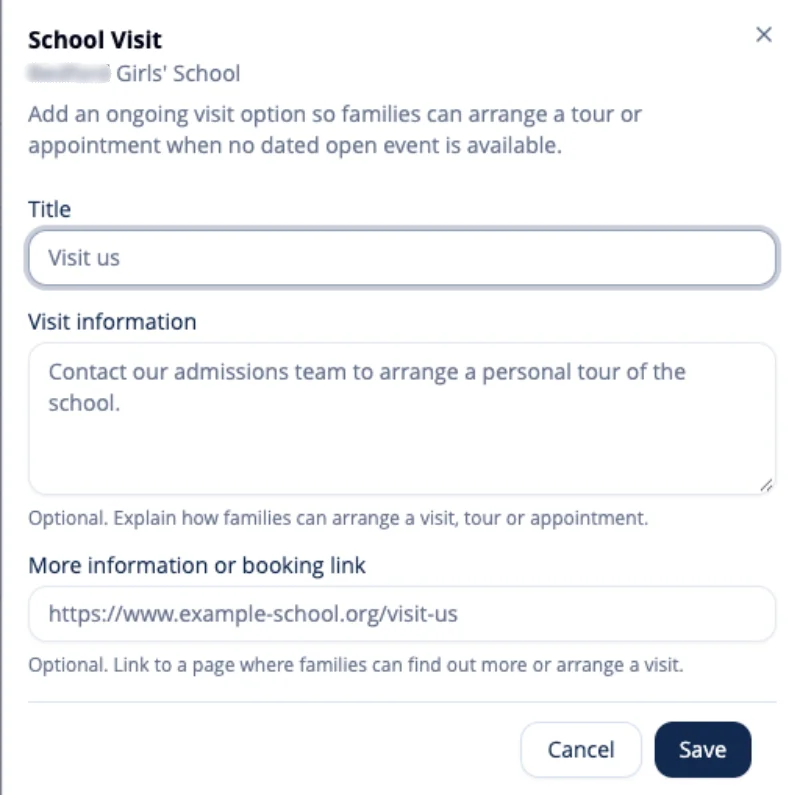
The School Visit panel opens with the details currently configured for the selected school.
Add the visit details
Title
Enter a title that clearly describes the visit option available to families.
For example:
Arrange a visit to our school
Visit information
Explain how families can arrange a visit, tour or appointment.
You might include information about what a visit involves, who it is suitable for and how families should arrange one.
More information or booking link
Optionally, add a link to a page on your school’s website where families can find out more or arrange their visit.
Save the School Visit
Select Save when you have finished.
The School Visit remains available without requiring a specific event date.
Update a School Visit
Return to Open Events → School Visit whenever you need to change the title, visit information or booking link.
Make the required changes and select Save.
Remove a School Visit
If your school no longer wants to offer the ongoing visit option, open the School Visit panel and select Remove school visit.
This removes the School Visit without affecting any of your school’s dated Open Events.