
Managing press releases
Pressburst separates press releases that are still being prepared from releases that have already been distributed.
Both are available from the News section of the main navigation.
Draft releases
Open News → Draft Releases to view press releases that have not yet been sent.
From here you can return to a draft release to continue working on it.
A draft can be reviewed and updated before you proceed to distribution.
Sent releases
Open News → Sent Releases to view press releases that have already been distributed.
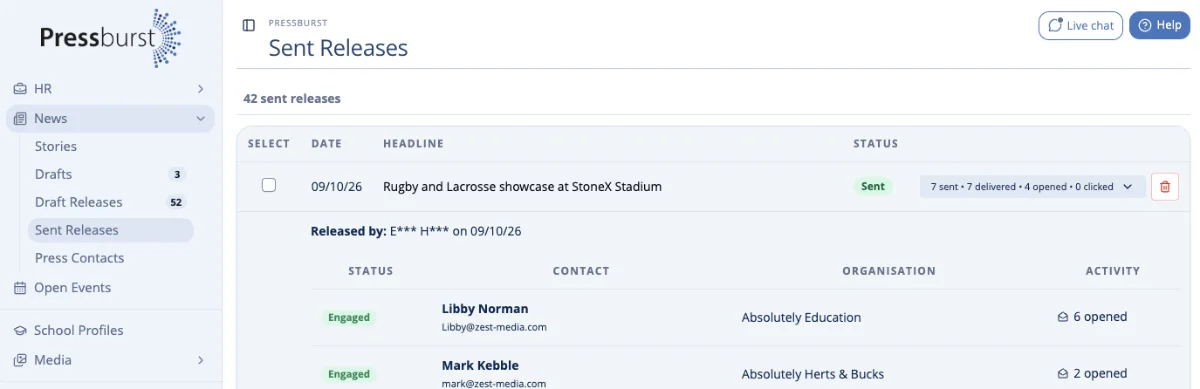
The Sent Releases page provides a record of the releases your school or organisation has distributed through Pressburst.
For each release, you can see its distribution statistics, including:
- Sent – the number of recipients the release was sent to.
- Delivered – the number of emails successfully delivered.
- Opened – the number of recipients who opened the email.
- Clicked – the number of recipients who clicked a link in the email.
View recipient activity
Select the arrow beside a release’s distribution statistics to expand its recipient details.
The expanded view shows the individual contacts who received the release, their organisations and their engagement activity.
This allows you to see which recipients have received and interacted with your press release.
A recipient may open the same email more than once, so individual activity counts can be higher than the number of recipients.
Creating another press release
Press releases are created from published news stories.
To prepare a new release, open News → Stories and select Prepare Press Release beside the story you want to use.
Alternatively, you can choose to prepare a press release immediately after publishing a news story.
See Creating a press release for more information.
Managing your recipients
Press contacts are maintained separately from individual press releases.
Use News → Press Contacts to manage the journalists and media contacts available when distributing releases.
See Press contacts for more information.